
Many design departments have tasks that always follow the same pattern: creating parts from table values, transferring data from the model into an in-house application, showing the results of a calculation directly on the model. Alibre Design does not provide every one of these functions out of the box. Through its programming interface, however, the program can be extended exactly where it is needed.
Alibre has put together a new set of documents for this. New among them are templates that let AI assistants such as Claude Code or Codex help with the development of add-ons.
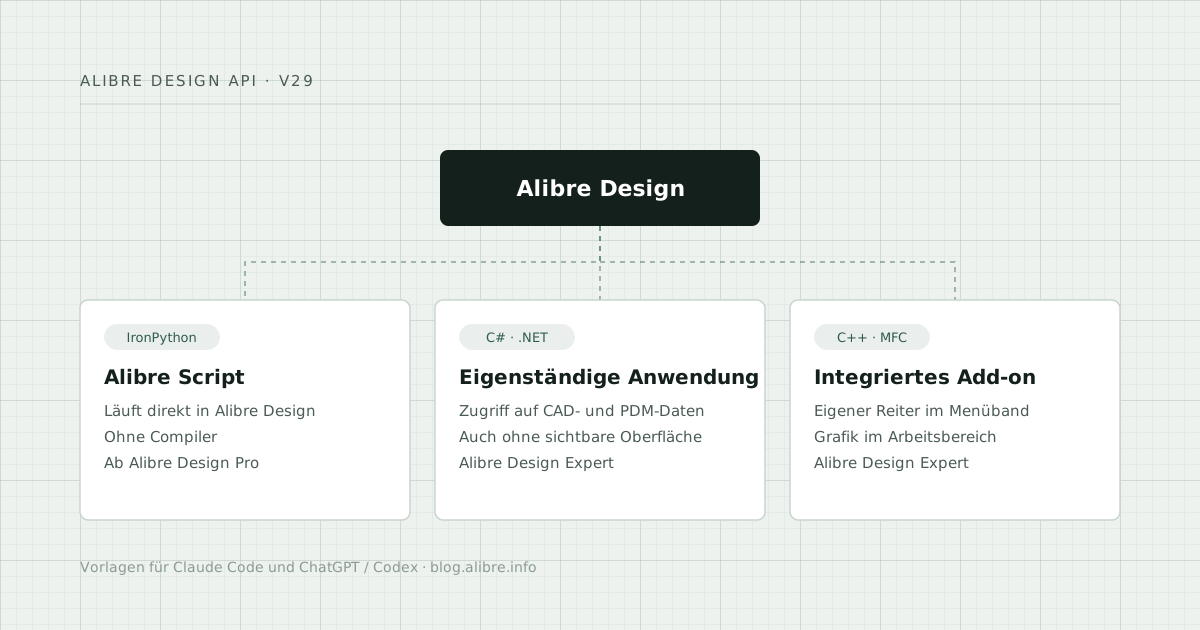
Three ways to build your own extension
Alibre Script. Scripts run directly in Alibre Design on IronPython (Python 2.7 syntax). Without a compiler and without Visual Studio, they can create parts parametrically or automate recurring steps. Suitable for anyone who wants to get to a result quickly.
Standalone application (C#). A separate Windows program connects to Alibre Design, reads and writes CAD and PDM data and can also control Alibre Design without a visible user interface. Typical for configurators or for connecting to other systems.
Integrated add-on (C++). The add-on runs inside Alibre Design: with its own tab in the ribbon, its own area in the Design Explorer, graphics output in the workspace and its own data, which is stored in the Alibre file.
What Alibre provides
- API reference V29 as a Windows help file: all objects and methods, from sketches and features through assemblies and drawings to the PDM vault
- Four sample projects for Visual Studio 2022: a C# program for PDM access and three C++ add-ons covering object selection, animation and custom graphics output
- Guide for integrated add-ons (PDF, 12 pages)
- Alibre Script reference as a Windows help file
All documents are in English.
New: templates for Claude Code and Codex
There is a prepared work package for Claude Code and one for ChatGPT/Codex. Each contains the API reference in a form that AI assistants can read, all four sample projects, the guide and a rules file. This rules file leads the assistant step by step: locating the Alibre installation and Visual Studio, clarifying the right approach (C# or C++), setting up the project and integrating it.
A third package is aimed at Alibre Script: with it, Claude Code writes scripts based on the script reference and, at the end, offers to copy the finished script into the script folder of Alibre Design.
The packages do not deliver a finished add-on. They are a working folder in which the tool is developed in dialogue with the assistant.
Requirements
- API: Alibre Design Expert and Visual Studio. For C++ add-ons, the MFC component must also be installed in Visual Studio.
- Alibre Script: Alibre Design Pro or Expert
All documents with description and download
On alibre.info, every file is described individually, with file size, contents and direct download, plus a note on how to unblock the help files in Windows: Alibre Design API: documentation, examples and AI templates (page in German).
If you want to start with scripts, you will find examples and notes on the page Alibre scripts (in German).